Browser-Driven Verification of Every PR

What if every PR came with proof that it works?
How much money is that worth? How much time can you save by automating it?
We got it down to 10 cents a PR on average. Here’s how.
Where it started: pr-screenshots
For a few months we had been using a skill we created. We called it pr-screenshots. It uses Playwright to drive a headless Chromium, logs into the app, and checks the relevant changes depending on the pull request.
Turns out Claude is pretty good at using our app. It finds the relevant pages, uses or creates the data and routes it needs, and then actually uses the new or changed feature. It can easily tell what routes and logic it needs to test from the code changes in the PR.
It proved useful in finding issues, and it gave us proof that the PR actually worked the way it was supposed to. It also made it easy to add an E2E test, because the flow was already worked out.
What we gained: verification.
What if we could do this on every PR?
Running it by hand on our Claude subscriptions was fine. But once we tried to automate it, we were paying API prices, and having Claude drive the browser cost anywhere from $6 to $15 per PR.
That’s not sustainable for every PR.
Enter Jev
What is Jev? It’s a different kind of model that’s trained for evaluation. You give it some state and a question with a fixed set of answers, and it gives you back a probability for each answer.
It can’t write or plan, it can only pick an answer. But that’s all you need to drive a browser, as long as something else does the planning.
The state we give it is a plain-text accessibility snapshot of the page:
Which gives you YAML like this:
It’s small and structured, and every element has a ref we can click. If a dialog is open we only send the dialog, so Jev doesn’t get confused by the page behind it.
So each step is one question, like “Which element do I click to open the New EMOD form?” The answers are the refs on the page. Jev puts the highest probability on e12, and Playwright clicks it. Checks work the same way, like “Does the NCCI row show current factor 1.15?” Jev answers yes or no with a probability.
How it works
The key is splitting up the work. Sonnet plans once, and Jev does all the driving.
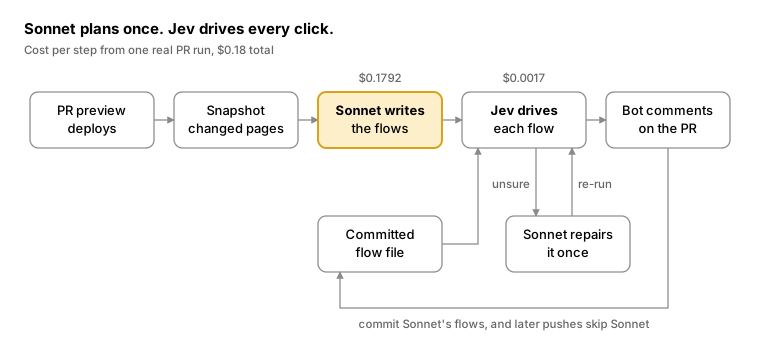
- A preview deploys for the PR, and the bot works out which pages the PR changes or renders.
- Before Sonnet writes anything, we open each changed page and grab its accessibility snapshot. That way Sonnet uses the labels that are actually on the page, instead of guessing them from the code.
- Sonnet reads the diff and those snapshots in a single call with no tools, and writes up to three flows.
- Jev drives each flow. It picks every click and answers every check, and Playwright does the actual clicking.
- If a flow comes back unsure, we run it again. If it’s still unsure, Sonnet gets one try at fixing it, and we run it one more time.
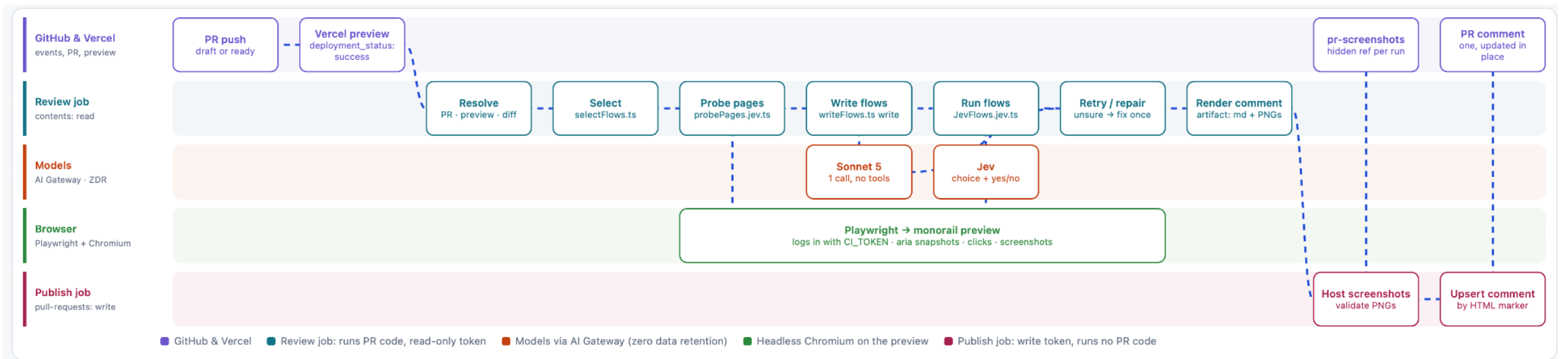
Under the hood there are two jobs. The review job runs the PR’s code, so it only gets a read-only token. The publish job can write to the PR, but it never runs PR code. All it does is validate the screenshots and update the PR comment. Both models go through AI Gateway with zero data retention.
A flow is just JSON. Here’s a real one Sonnet wrote for a PR that added a knowledge source detail page:
A goal is something Jev clicks toward, one element at a time. The until stops it as soon as the page shows what we expect. A text check is just Playwright, no model involved. A question is for anything that needs judgment, and those go to Jev. And gaps is where Sonnet lists what the flow can’t prove.
This one came back unsure the first time. Sonnet fixed it, and it passed on the re-run.
What does this give us?
The bot leaves one comment on the PR and updates it on every push. For that knowledge source PR it looked like this:
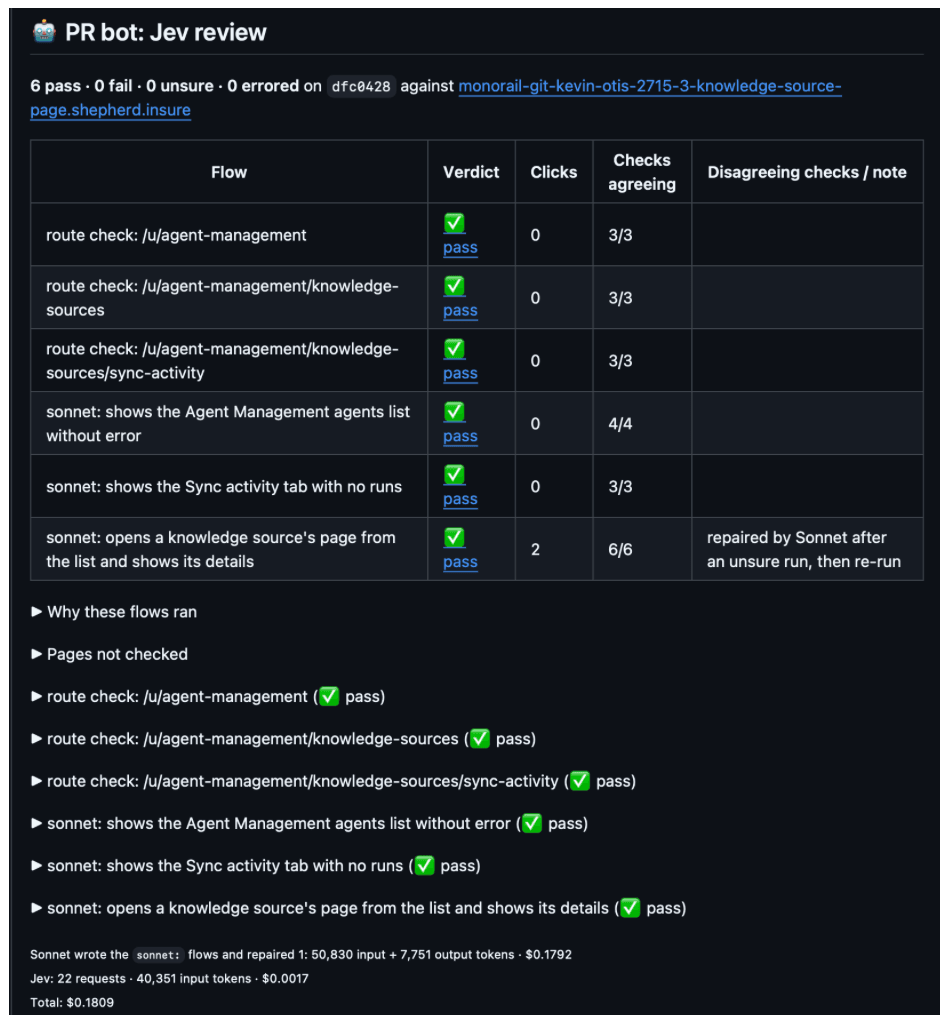
You get a nice little summary and screenshots of the app in action, so you can see whether the changes in the PR actually work or not.
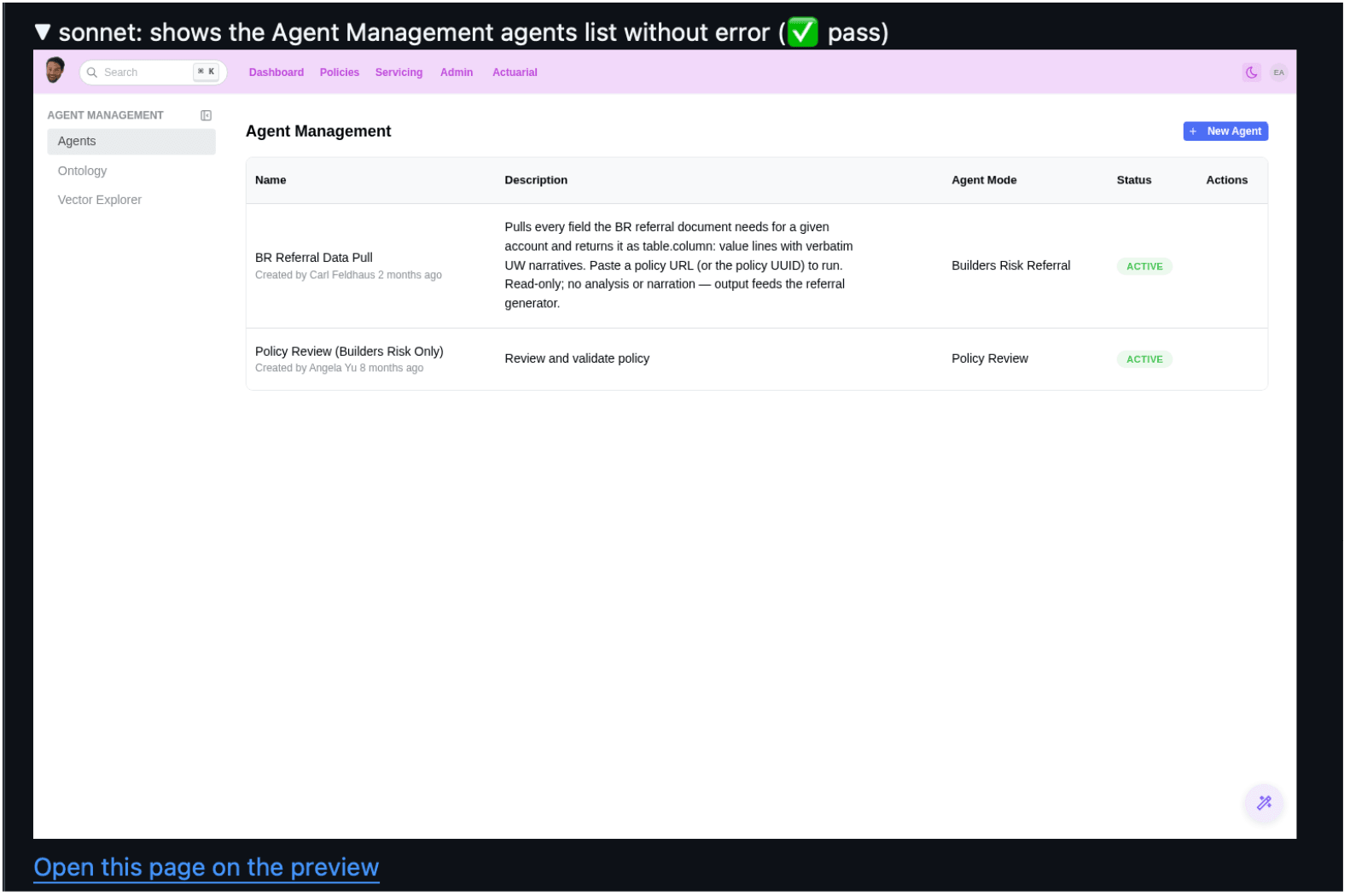
Plus a direct link to the preview environment, so the developer can verify and use the app themselves.
The comment also tells you what it didn’t check. That PR added a detail page with an ID in the route, and the bot had no way to seed one, so it called that out instead of just skipping it.
So how much money is it worth?
That whole run cost $0.18, for six flows and one repair.
| Part | What it did | Usage | Cost |
|---|---|---|---|
| Sonnet | Wrote 3 flows, repaired 1 | 50,830 input + 7,751 output tokens | $0.1792 |
| Jev | Picked every click, answered every check | 22 requests, 40,351 input tokens | $0.0017 |
| Total | $0.1809 |
Compare that to $6–$15 per PR when Claude drove the browser itself.
The “expensive” part is Sonnet writing the flows based on the PR. Jev costs a fraction of a cent.
So we don’t throw Sonnet’s work away. The comment includes the flows as a file you can commit to the PR. After that, every push runs the committed flow instead of asking Sonnet again, so you get the same flow every time and you can re-use it or change it.
What do you lose?
Jev is cheap because all it does is pick an answer, but that’s also what limits it.
- It can’t see pixels. Jev only reads the accessibility tree, so a broken layout with the right labels will still pass. That’s why the screenshots are there, so a person can look at them.
- It can’t improvise. If the flow is wrong, Jev won’t come up with a better one. That’s what the Sonnet repair is for, and sometimes the result is just unsure.
- Some things it can’t check at all. Things like downloads, editing cells in a grid, or comparing exact numbers across pages. Each flow lists these in its gaps.
- It only sees what’s labeled. If a control has no accessible name, Jev can’t see it. That’s actually been a nice side effect, since it keeps pushing us to write better markup.
- A route check only proves the page renders. It doesn’t prove the feature actually works.
This isn’t a replacement for our tests. We still have E2E tests, and we still use Playwright for full coverage. The bot doesn’t block merges, it just checks that the PR does what it says. And if you want to write an E2E test for it, the flow gives you a head start.